Strictly speaking, the Scheduler is a special type of Controller — its working principle is no different from other controllers.
The Scheduler’s special responsibility is to monitor all unscheduled Pods in the cluster and obtain the health status and resource usage of all nodes, selecting the best node for each pending Pod to complete scheduling.
kube-scheduler is responsible for assigning and scheduling Pods to nodes within the cluster. It watches kube-apiserver for Pods that haven’t been assigned to a Node, then assigns nodes to these Pods based on scheduling policies (by updating the Pod’s NodeName field).
Designing a scheduler requires careful consideration of many factors:
- Fair scheduling
- Efficient resource utilization
- QoS (Quality of Service)
- Affinity and anti-affinity
- Data locality
- Inter-workload interference
- Deadlines
Scheduler
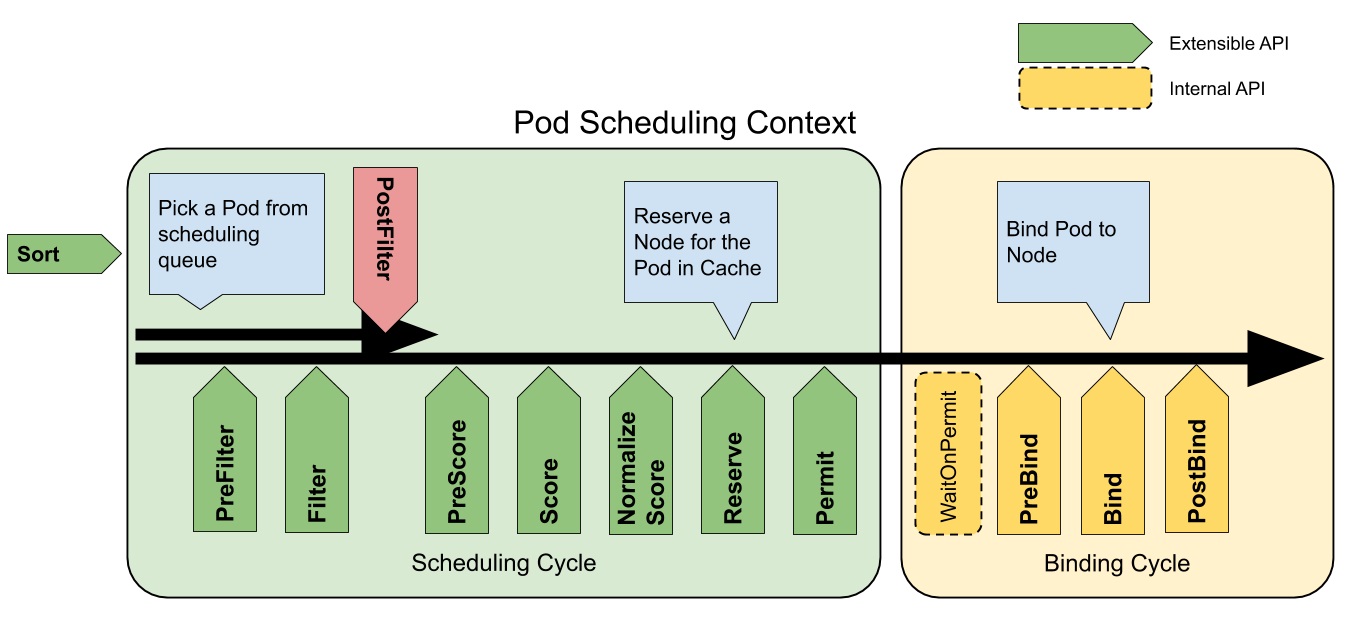
kube-scheduler scheduling is divided into several phases:
- Predicate: Takes all nodes and filters out those that don’t meet the conditions.
- Priority: Ranks the remaining nodes by priority and selects the highest-priority node.
- Bind: Binds the selected node to the Pod, completing the scheduling.
Scheduling Cycle & Binding Cycle
Predicate Strategies
These are just the common strategies — there are many more, and you can also write your own.
- PodFitsHostPorts: Checks for Host Port conflicts.
- PodFitsPorts: Same as PodFitsHostPorts.
- PodFitsResources: Checks if the Node has sufficient resources, including allowed Pod count, CPU, memory, GPU count, and other OpaqueIntResources.
- Hostname: Checks if pod.Spec.NodeName matches the candidate node.
- MatchNodeSelector: Checks if the candidate node matches pod.Spec.NodeSelector.
- NoVolumeZoneConflict: Checks for volume zone conflicts.
- MatchInterPodAffinity: Checks if Pod affinity requirements are met.
- NoDiskConflict: Checks for Volume conflicts — only used for GCP PD, AWS EBS, Ceph RBD, and iSCSI.
- PodToleratesNodeTaints: Checks if the Pod tolerates Node Taints.
- CheckNodeMemoryPressure: Checks if the Pod can be scheduled on a node with MemoryPressure.
- CheckNodeDiskPressure: Checks if the Pod can be scheduled on a node with DiskPressure.
- NoVolumeNodeConflict: Checks if the node meets the conditions of Volumes referenced by the Pod.
Priority Strategies
After the Predicate phase, the remaining nodes are scored and ranked.
- SelectorSpreadPriority: Prefer to reduce the number of Pods belonging to the same Service or Replication Controller on a node.
- InterPodAffinityPriority: Prefer scheduling Pods to the same topology (same node, rack, zone, etc.).
- LeastRequestedPriority: Prefer scheduling to nodes with fewer requested resources.
- BalancedResourceAllocation: Prefer balancing resource usage across nodes.
- NodePreferAvoidPodsPriority: Based on the alpha.kubernetes.io/preferAvoidPods annotation, with a weight of 10000 to override other priority strategies.
- NodeAffinityPriority: Prefer scheduling to nodes matching NodeAffinity.
- TaintTolerationPriority: Prefer scheduling to nodes matching TaintToleration.
- ServiceSpreadingPriority: Try to distribute Pods of the same Service across different nodes — replaced by SelectorSpreadPriority (not used by default).
- EqualPriority: Sets all node priorities to 1 (not used by default).
- ImageLocalityPriority: Try to schedule containers using large images to nodes that have already pulled the image (not used by default).
- MostRequestedPriority: Try to schedule to already-used nodes — particularly suited for cluster-autoscaler (not used by default).
Node-Specific Scheduling
You can schedule Pods to specific nodes using nodeSelector, nodeAffinity, podAffinity, as well as Taints and Tolerations.
You can also directly set the nodeName parameter to schedule a Pod to a specific node.
NodeSelector
You can label a Pod with nodeSelector so that during creation, it gets scheduled to a node with the matching key-value pair.
apiVersion: v1
kind: Pod
metadata:
	name: nginx
spec:
  containers:
  - name: nginx
    image: nginx
    imagePullPolicy: IfNotPresent
  nodeSelector:
    disktype: ssd
NodeAffinity
NodeAffinity currently supports two types:
- requiredDuringSchedulingIgnoredDuringExecution: Must satisfy the condition.
- preferredDuringSchedulingIgnoredDuringExecution: Preferred condition.
apiVersion: v1
kind: Pod
metadata:
  name: with-affinity-anti-affinity
spec:
  affinity:
    nodeAffinity:
      requiredDuringSchedulingIgnoredDuringExecution:
        nodeSelectorTerms:
        - matchExpressions:
          - key: kubernetes.io/os
            operator: In
            values:
            - linux
      preferredDuringSchedulingIgnoredDuringExecution:
      - weight: 1
        preference:
          matchExpressions:
          - key: label-1
            operator: In
            values:
            - key-1
      - weight: 50
        preference:
          matchExpressions:
          - key: label-2
            operator: In
            values:
            - key-2
  containers:
  - name: with-node-affinity
    image: k8s.gcr.io/pause:2.0
PodAffinity
PodAffinity selects Nodes based on Pod labels, scheduling only to Nodes where matching Pods are running. Supports both PodAffinity and PodAntiAffinity.
- requiredDuringSchedulingIgnoredDuringExecution: Must satisfy the condition.
- preferredDuringSchedulingIgnoredDuringExecution: Preferred condition.
apiVersion: v1
kind: Pod
metadata:
  name: with-pod-affinity
spec:
  affinity:
    podAffinity:
      requiredDuringSchedulingIgnoredDuringExecution:
      - labelSelector:
          matchExpressions:
          - key: security
            operator: In
            values:
            - S1
        topologyKey: topology.kubernetes.io/zone
    podAntiAffinity:
      preferredDuringSchedulingIgnoredDuringExecution:
      - weight: 100
        podAffinityTerm:
          labelSelector:
            matchExpressions:
            - key: security
              operator: In
              values:
              - S2
          topologyKey: topology.kubernetes.io/hostname
  containers:
  - name: with-pod-affinity
    image: k8s.gcr.io/pause:2.0
Taints and Tolerations
With NodeSelector alone, there’s no way to forcefully prevent Pods from being scheduled to certain Nodes. Or perhaps when initially planning Kubernetes, you didn’t anticipate that all departments would use it — and now everyone’s on K8s, requiring node isolation. Taints and Tolerations solve these problems.
Taints and Tolerations ensure Pods aren’t scheduled to inappropriate Nodes. Taints are applied to Nodes, while Tolerations are applied to Pods.
Currently supported Taint types:
- NoSchedule: New Pods won’t be scheduled to this node; running Pods aren’t affected.
- PreferNoSchedule: Soft version of NoSchedule — try not to schedule to this node.
- NoExecute: New Pods won’t be scheduled to this node, and existing running Pods will be evicted. Pods can specify a tolerationSeconds duration.
When a Pod’s Tolerations match all of a Node’s Taints, it can be scheduled to that Node. If the Pod is already running, it won’t be evicted.
In Kubernetes, when a node has issues, the system uses the Taints mechanism to label the node with key-value pairs, ensuring no new Pods are scheduled to it. The tolerationSeconds setting ensures that if the node recovers within the specified time, Pods won’t be evicted.
PriorityClass
Starting from v1.8, kube-scheduler supports defining Pod priorities to ensure high-priority Pods are scheduled first.
preemptionPolicy:
- PreemptLowerPriority: Allows Pods with this PriorityClass to preempt lower-priority Pods.
- Never: Non-preemptive.
apiVersion: scheduling.k8s.io/v1
kind: PriorityClass
metadata:
  name: high-priority
value: 1000000
preemptionPolicy: Never
globalDefault: false
description: "This priority class should be used for XYZ service pods only."
Multiple Schedulers
If the default scheduler doesn’t meet your needs, you can deploy custom schedulers. Multiple scheduler instances can run simultaneously in the cluster. Use pod.spec.schedulerName to select which scheduler to use (defaults to the built-in scheduler).
Conclusion
I’m gaining deeper insight into K8s’ overall architecture. Looking forward to fully mastering K8s!
Feel free to leave a comment on my blog. Your feedback motivates me to keep writing. Thank you for reading, and let’s grow together to become better versions of ourselves.