API Server
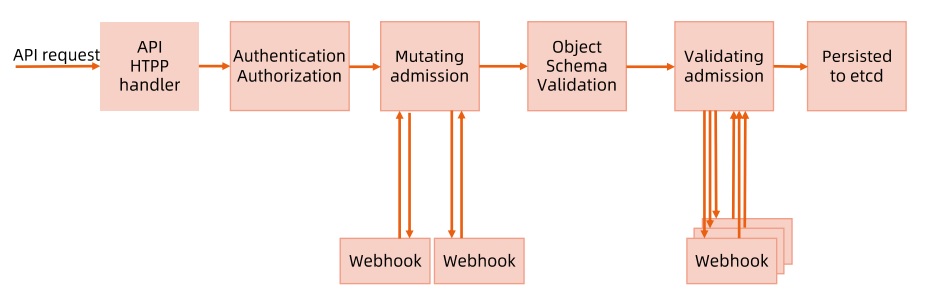
kube-apiserver is one of the most important core components of Kubernetes, providing the following key features:
- Cluster management REST API, including authentication, authorization, data validation, and cluster state changes
- Authentication
- Authorization
- Admission (Mutating & Validating)
- Acts as the data exchange and communication hub between other modules. Other modules can only query or modify data through the API Server — only the API Server can directly operate on etcd.
kube-apiserver supports HTTPS (default port 6443) and HTTP API (default listening on 127.0.0.1:8080). The HTTP API is insecure with no authentication or authorization mechanism — it’s not recommended for production environments.
Authentication
When TLS is enabled, all requests must first be authenticated. Kubernetes supports multiple authentication mechanisms and allows enabling multiple authentication plugins simultaneously (passing any one is sufficient). If authentication succeeds, the user’s username is passed to the authorization module for further verification. Failed authentication requests return 401. Recent versions default to TLS for authentication.
Common Authentication Methods
- X.509
- Uses X509 client certificates. Simply configure –client-ca-file=SOMEFILE when starting the API Server. During certificate authentication, the CN field serves as the username and the organization field serves as the group name.
- Static Token File
- Configure –token-auth-file=SOMEFILE when starting the API Server.
- The file is in CSV format, with each row containing at least three columns: token,username,userid,“group1,group2,group3”
- Bootstrap Token
- To support smooth bootstrapping of new clusters, Kubernetes includes a dynamically managed token type called Bootstrap Token.
- These tokens are stored as Secrets in the kube-system namespace and can be dynamically managed and created.
- The TokenCleaner controller in the controller manager can delete bootstrap tokens when they expire.
- When deploying Kubernetes with kubeadm, you can query tokens with the
kubeadm token listcommand.
- Static Password File
- Configure –basic-auth-file=SOMEFILE when starting the API Server. File format is CSV with at least three columns per row: password,user,uid,“group1,group2,group3”.
- ServiceAccount
- ServiceAccounts are automatically generated by Kubernetes and automatically mounted to the container’s /run/secrets/kubernetes.io/serviceaccount directory.
- OpenID
- OAuth 2.0 authentication mechanism.
- Webhook Token Authentication
- –authentication-token-webhook-config-file points to a config file describing the remote Webhook service.
- –authentication-token-webhook-cache-ttl sets the cache duration for authentication decisions. Default is two minutes.
- Anonymous Requests
- If using an authentication mode other than AlwaysAllow, anonymous requests are enabled by default but can be disabled with –anonymous-auth=false.
Authorization
Authorization provides access control for cluster resources by checking request attributes against corresponding access policies. API requests must satisfy certain policies to be processed.
Similar to authentication, Kubernetes supports multiple authorization mechanisms and allows enabling multiple authorization plugins simultaneously (passing any one is sufficient).
If authorization succeeds, the request is sent to the admission control module for further validation. Failed authorization requests return HTTP 403.
Kubernetes authorization handles the following request attributes:
- user, group, extra
- API, request method (e.g., get, post, update), and request path (e.g., /api)
- Request resource and sub-resource
- namespace
- API Group
Currently supported authorization plugins:
- ABAC
- RBAC
- Webhook
- Node
Admission Control
Admission Control performs further validation or adds default parameters to requests after authorization. Unlike authorization and authentication, which only concern the requesting user and operation, admission control also handles request content. It’s effective only for create, update, delete, or connect (proxy) operations — not for read operations.
Admission control supports enabling multiple plugins called in sequence. A request is only admitted if ALL plugins approve it.
Admission Control Plugins
- AlwaysAdmit: Accepts all requests.
- AlwaysPullImages: Always pulls the latest image — very useful in multi-tenant scenarios.
- DenyEscalatingExec: Denies exec and attach operations on privileged containers.
- ImagePolicyWebhook: Determines image policy via Webhook, requires configuring –admission-control-config-file.
- ServiceAccount: Automatically creates default ServiceAccounts and ensures that ServiceAccounts referenced by Pods exist.
- SecurityContextDeny: Rejects containers with illegal SecurityContext configurations.
- ResourceQuota: Ensures Pod requests don’t exceed quotas. Requires creating a ResourceQuota object in the namespace.
- LimitRanger: Sets default resource requests and limits for Pods. Requires creating a LimitRange object in the namespace.
- InitialResource: Sets default resource requests and limits for containers based on image usage history.
- NamespaceLifecycle: Ensures namespaces in termination state no longer accept new object creation requests, and rejects requests to non-existent namespaces.
- DefaultStorageClass: Sets a default StorageClass for PVCs.
- DefaultTolerationSeconds: Sets the default forgiveness toleration for Pods to five minutes.
- PodSecurityPolicy: Must be enabled when using Pod Security Policies.
- NodeRestriction: Restricts kubelet to only access node, endpoint, pod, service, and related secret, configmap, PV, and PVC resources.
Beyond default admission control plugins, Kubernetes provides extension points for user-defined admission control plugins:
- MutatingWebhookConfiguration: Mutating plugin that supports modifying admission objects.
- ValidatingWebhookConfiguration: Validating plugin that can only validate admission object legality, not modify them.
API Server Access Control Flow
Rate Limiting
To prevent burst traffic from affecting kube-apiserver availability, Kubernetes supports multiple rate limiting methods:
- MaxInFlightLimit
- Client Rate Limiting
- EventRateLimit
- APF (API Priority and Fairness)
MaxInFlightLimit
You can set maximum concurrency for kube-apiserver via parameters:
- max-requests-inflight: Maximum number of requests within a given time period.
- max-mutating-requests-inflight: Maximum number of mutating requests within a given time period, adjusting the apiserver’s flow control QoS.
Client Rate Limiting
Only supports client-side rate limiting. The cluster cannot control user behavior — for example, client-go’s default QPS is 5.
EventRateLimit
Only limits event requests. Integrated as an internal webhook in kube-apiserver, it can configure event operation limits for specific users, namespaces, servers, etc.
- Pros
- Simple implementation, allows a certain number of concurrent requests.
- Supports server/namespace/user level rate limiting.
- Cons
- Only supports events; webhook implementation can only intercept mutating requests.
- All namespaces have the same rate limits with no priority concept.
API Priority and Fairness
kube-apiserver’s default rate limiting is too simplistic — a single misbehaving client sending massive requests could disrupt other clients. APF is an alternative to MaxInFlightLimit. See KEP-1040: Priority and Fairness for API Server Requests.
- APF classifies and isolates requests at a finer granularity.
- It introduces a bounded queuing mechanism, so the API server won’t reject any requests during very brief bursts.
- Using fair queuing techniques to distribute requests from queues, a misbehaving controller won’t starve other controllers (even at the same priority level).
- APF’s core concepts:
- Multiple priority levels
- Multiple queues
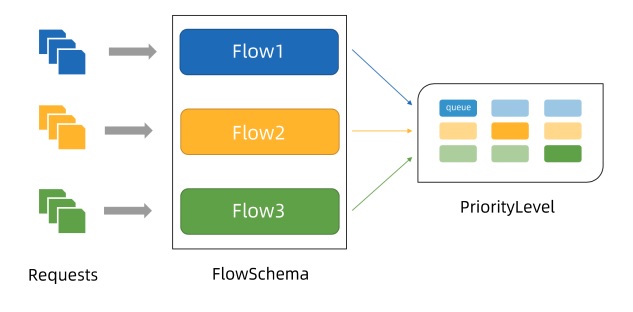
Concepts
- Incoming requests are classified by FlowSchema based on their attributes and assigned priorities.
- Each priority level maintains custom concurrency limits, enhancing isolation so requests at different priorities don’t starve each other.
- Within the same priority level, fair queuing algorithms prevent different flows from starving each other.
- The algorithm queues requests, preventing traffic bursts from causing request failures when average load is low.
Priority
- Without APF enabled, overall API server concurrency is limited by kube-apiserver’s –max-requests-inflight and –max-mutating-requests-inflight parameters.
- With APF enabled, the concurrency limits defined by these parameters are summed, then the total is distributed across a set of configurable priority levels. Each incoming request is assigned a priority level.
- Each priority level has its own configuration setting the allowed number of concurrent requests.
Queuing
- Even within the same priority level, there may be many different traffic sources.
- Under overload conditions, preventing one request flow from starving others is valuable (especially in common scenarios where a faulty client floods kube-apiserver with requests — ideally, that faulty client shouldn’t significantly impact others).
- Fair queuing algorithms handle the above scenario for requests with the same priority.
- Each request is assigned to a Flow, identified by the corresponding FlowSchema name plus a flow distinguisher.
- The flow distinguisher can be the requesting user, the target resource’s namespace, or nothing at all.
- The system attempts to give equal weight to requests from different flows with the same priority.
- After dividing requests into flows, APF assigns requests to queues.
- Assignment uses a technique called Shuffle-Sharding, which relatively effectively isolates low-intensity and high-intensity flows using queues.
- Queuing algorithm details can be tuned per priority level, allowing administrators to balance memory usage, fairness (when total traffic exceeds limits, each independent flow makes progress), burst traffic tolerance, and additional latency from queuing.
Exempt Requests
Certain non-critical requests are not subject to any limits imposed by this feature. These exemptions prevent improper traffic configuration from completely disabling the API server.
PriorityLevelConfiguration
A PriorityLevelConfiguration represents a single isolation type. Each PriorityLevelConfiguration has its own limit on outstanding requests and queued requests.
apiVersion: flowcontrol.apiserver.k8s.io/v1alpha1
kind: PriorityLevelConfiguration
metadata:
  name: restrict-pod-lister
spec:
  type: Limited
  limited:
    assuredConcurrencyShares: 5 # Allowed concurrent requests
    limitResponse:
      queuing:
        handSize: 4 # Shuffle sharding config: number of queues each flowschema + distinguisher request is enqueued to
        queueLengthLimit: 20 # Object count per queue
        queues: 10 # Total queues for this PriorityLevel
      type: Queue
FlowSchema
FlowSchema matches certain inbound requests and assigns them to a priority level.
Each inbound request is tested against all FlowSchemas, starting with the lowest matchingPrecedence value, proceeding in order until a match is found.
apiVersion: flowcontrol.apiserver.k8s.io/v1alpha1
kind: FlowSchema
metadata:
  name: restrict-pod-lister
spec:
  matchingPriority: 800 # Rule priority
  priorityLevelConfiguration:
    name: restrict-pod-lister # Corresponding queue priority
  distinguisherMethod:
    type: ByUser # Distinguisher
  rules:
  - resourceRules: # Corresponding resources and request types
    - apiGroups: [""]
      namespaces: ["demo"]
      resources: ["pods"]
      verbs: ["list", "get"]
    subjects:
    - kind: ServiceAccount
      serviceAccount:
        name: podlister-0
        namespace: demo
    - kind: ServiceAccount
      serviceAccount:
        name: podlister-1
        namespace: demo
    - kind: ServiceAccount
      serviceAccount:
        name: podlister-2
        namespace: demo
Conclusion
I didn’t expect kube-apiserver, as the cluster’s most important API component, to do so much. I also gained a deeper understanding of the APF mechanism. Looking forward to this feature being fully released!
Feel free to leave a comment on my blog. Your feedback motivates me to keep writing. Thank you for reading, and let’s grow together to become better versions of ourselves.